September 22, 2026
How to Create Team Trivia in 5 Minutes (No Login or Setup Needed)
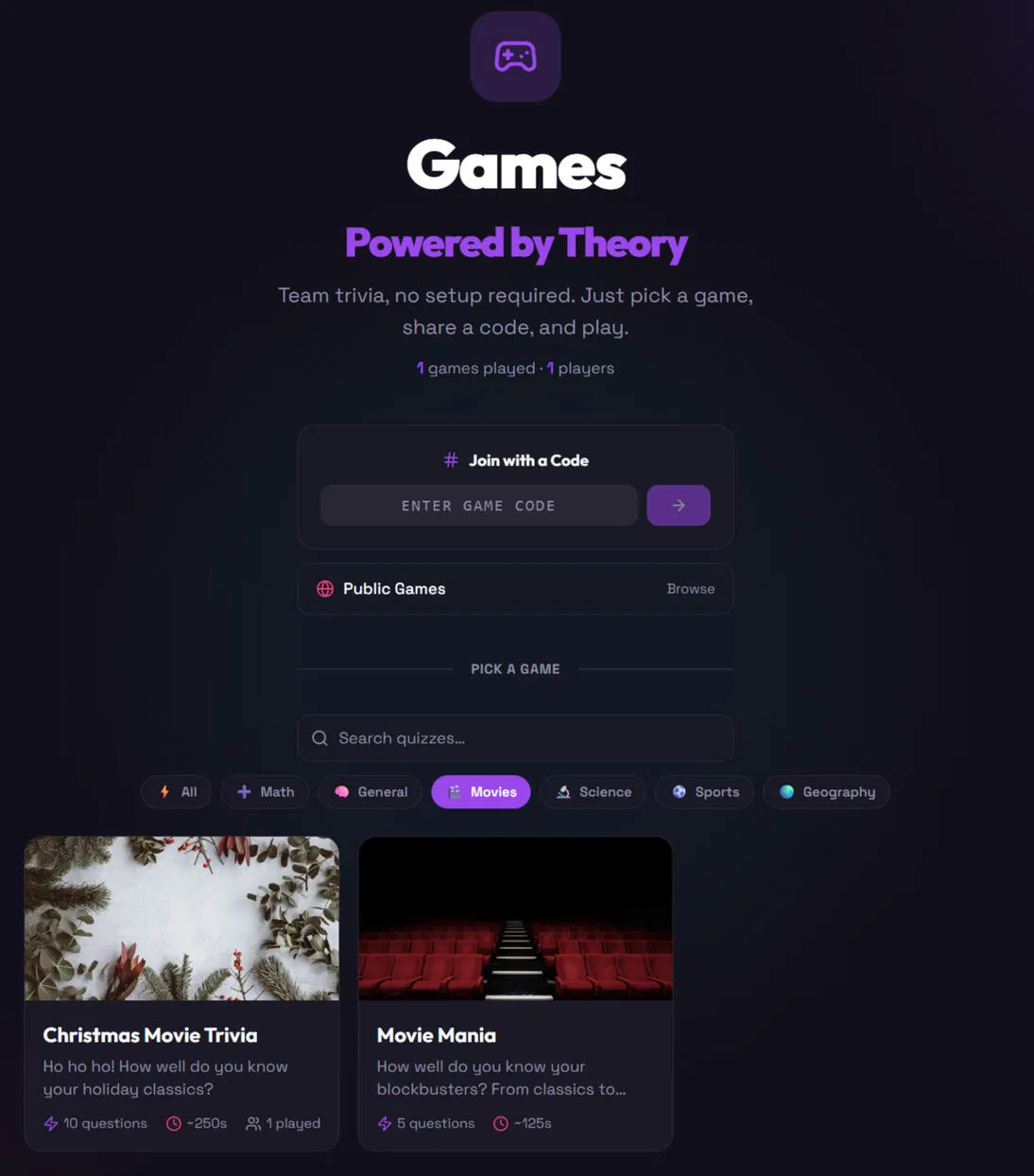
Team trivia should be quick to start. You should not need to create accounts, download an app, build a quiz, or explain a complicated process before the first question.
The simple version is:
- Pick a game.
- Share a code.
- Play.
That is the whole setup.
With Games: Powered by Theory, you can run team trivia for work, remote meetings, team breaks, classrooms, or casual game sessions in a few minutes.
The five-minute team trivia plan
- Minute 1: Open the game library.
- Minute 2: Pick a trivia game.
- Minute 3: Start the game and copy the code.
- Minute 4: Share the code with your team.
- Minute 5: Start playing.
No login. No account creation. No downloads. No setup checklist. Just a browser and a group ready for a quick challenge.
1. Open the team trivia game library
Go to the team trivia game library. You will see a list of ready-to-play quizzes and games. Browse by category or search for something specific.
Available categories include: General knowledge, Movies, Science, Sports, Geography, Math, Icebreakers, Custom games.
You do not need to prepare questions yourself. Pick a game that fits the group and move on. Running a short meeting? Choose a smaller quiz. Hosting a team social? Pick a pop culture or general knowledge game. Need an icebreaker? Start with a get-to-know-your-team activity. The goal is simple: find a game everyone can join without a long explanation.
2. Pick a game that fits your team
Choose a game from the library. The selection includes short quizzes, themed trivia, and simple group activities. You can use the same process for a five-minute break or a longer team building trivia session.
Try: General Knowledge Showdown (test the team across science, history, geography, and more), Movie Mania (challenge the film fans with questions about blockbusters and movie classics), 90s Pop Culture (bring back music, TV, slang, and questionable fashion choices), Get to Know Your Team (use quick questions to reveal surprising facts about the people you work with), Common Ground (find out what your teammates have in common — no login required).
Each game has a clear purpose. Pick one and start.

3. Start the game and get your code
Once you choose a game, start a live session. The game gives you a room code for your team. This is the only information players need to join. They do not need an account or a download — they simply enter the code in their browser.
The host controls the pace. Players answer in real time. Scores and leaderboards keep the game moving. For larger groups, the platform supports up to 100 players in one room, according to the Games, Powered by Theory overview.
That makes it useful for: small team meetings, department sessions, remote company events, training groups, classroom activities, company-wide trivia rounds.
Keep the code visible or paste it into the meeting chat. Then move to the next step.
4. Share the code with your team
Send the code where your team already communicates: Zoom chat, Microsoft Teams chat, Slack, Google Meet chat, email, or a shared screen.
Your message can be short:
Join the team trivia game with this code: 1234
That is enough. Players can join from a phone, laptop, or another device. They do not need to leave the video call. Open the game in a second browser tab and keep the meeting open.
This is what makes virtual team trivia easy. You do not need to send instructions, links to multiple tools, or account recovery steps. Share one code. Wait for the team to join. Start the first question.
5. Play the first round
When everyone is ready, begin. The game handles the questions and scoring. Players answer from their own screens while the host controls the round. The format works well for quick team trivia because there is very little waiting between questions.
You can: play one short round, run several themed quizzes, keep score across a team break, use a leaderboard for a friendly showdown, stop after five minutes or continue longer.
Correct answers matter. Speed can matter too. The live format gives the activity enough energy to feel like a game without turning it into a formal competition. Keep the tone light.
Ask: “How well do you know this topic?”, “Can you handle one more round?”, “Who is taking the lead?”, “Can you nail the final question?” A little challenge is enough.
Why team trivia works for work
Team trivia is easy to add to the workday because it does not require a major event. You can use it: before a weekly meeting, during a remote team break, at the end of a training session, as a new-hire icebreaker, during a virtual off-site, between project milestones, as a quick Friday activity.
The main benefit is low friction. People can join immediately. The host does not need to prepare a presentation. The team does not need to learn a new platform. The activity starts with a game, not a setup process. That matters when you have five minutes between meetings.
Team building trivia without the awkward setup
Team building activities often take too much preparation. Someone has to choose an activity, create an account, send instructions, test the settings, and explain how to join. By the time everyone is ready, the energy has gone.
Team building trivia keeps the process shorter. Pick a quiz. Share a code. Play together. Use general knowledge for a friendly competition. Use movie or music trivia for a more relaxed session. Use an icebreaker game when people are meeting for the first time.
You do not need to force a deep team-building exercise. A few shared questions can create conversation on their own. Keep it simple.

Quick ideas for your next trivia round
Need a theme? Use one of these:
- General knowledge — A reliable choice for mixed groups. Everyone gets a chance to contribute.
- Movies and TV — Good for informal team breaks. Choose a familiar category and let the debate begin.
- Geography — Test capitals, landmarks, countries, and borders.
- Sports — Use sports trivia for a group that enjoys friendly competition.
- Icebreaker trivia — Start with questions that reveal interests, habits, and unexpected team facts.
- Quick-fire math — Add a fast round when you want something short and energetic.
You can also use tools such as Random Teams if you need to split a larger group before the game.
What you do not need
You do not need: a trivia account, player profiles, an app download, printed question sheets, a spreadsheet for scoring, a presentation deck, a setup meeting, or a long set of instructions. You need a browser, a game, and a code.
That is the point of team trivia from Powered by Theory: remove the unnecessary steps so the team can get to the activity.
A simple host script
Use this if you want to start immediately:
“Open the game link. Enter the code I’m sharing in the chat. Pick a name and join the room. We’ll start when everyone is in.”
Then share the code. Wait a moment. Start the game. No long introduction needed.
Start your next team trivia game
You can create a team trivia session in five minutes:
- Open the game library.
- Pick a quiz.
- Start a room.
- Share the code.
- Play.
Use it for team building trivia, virtual team trivia, icebreaker trivia, or a quick challenge before the next meeting.